
For gaming and internet cafés in Egypt

Your café,
next level.

Every PC, every minute and every pound, on one screen. N Cafe times the PCs, sells the snack bar, closes the shift to the last piastre, and shows you every branch while you're away.

  • Arabic, Egyptian and English
  • A backup every 30 minutes
  • Every branch in one account
Features

Everything on the floor,
in your hands.

From the moment a customer sits down to the shift handover, N Cafe keeps the count. No notebook, no calculator.

PC time, to the second

Open time or prepaid, pause, add time, switch between the two. Each group of PCs has its own rate, with the rounding and free pause minutes you choose.

  • If a PC drops off, billing stops and resumes when it's back
  • Squad packages for 2, 3, 4 or 5 friends
  • Lock, restart or message a PC from the counter
Snack bar and stock

Products with photos, and stock that counts itself down. Customers order from their PC; the cashier confirms with one click.

Shifts that close right

Close a shift in three steps: the drawer, a note-by-note count, and the handover. Debts carry from shift to shift and never get lost.

Members, wallets and packages

Every regular gets an account and a balance. Top-up offers like "pay 100, get 125", and packages with daily or weekly hours you can freeze when needed.

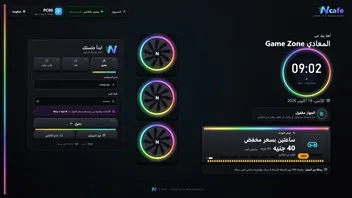
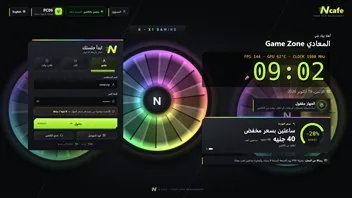
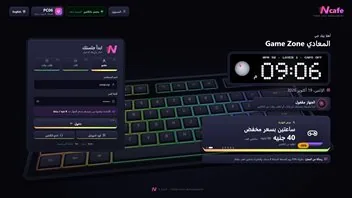
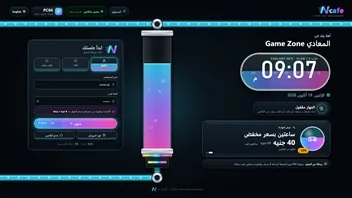
A customer screen in your café's look

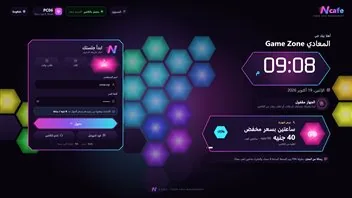
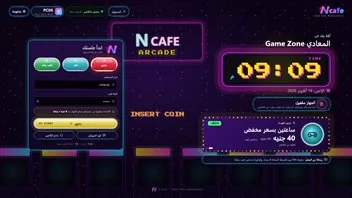
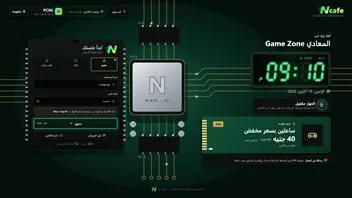
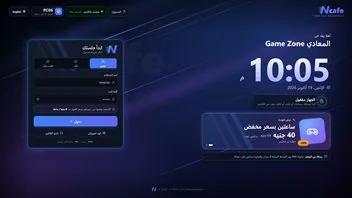
Customers sign in with their account, a ticket code, a QR scan from their phone, or by asking the cashier for time. Inside: the game library, programs, snack orders and a button to call the cashier.

N Cafe
RGB rig
Graphics card
Keyboard
Water cooling
Hexagon wall
Arcade
Motherboard

8 looks to choose from

Printed play tickets

An 8-digit code holding a money balance. Top it up, give it an expiry if you like, and the customer signs in with it on any PC.

Customers call from their seat

Six ready reasons and a voice note of up to 30 seconds reach the counter. The cashier can answer with a voice message to the PC.

Any PC's screen, at the counter

View a PC's screen or take control from the counter, with alerts when a PC runs hot or its disk is nearly full.

Reports on everything

Revenue, the drawer, PC use, the snack bar, members and customer calls, with filters and a dashboard for the whole week.

How it works

Four stations,
one system.

The counter is the heart. The PCs, the phones and the cloud all connect to it.

01

The counter

N Server

One program on the counter PC sees every PC, starts it and bills it.

  • PCs find the counter on the network by themselves, no pairing codes
  • Start, pause, add time or settle up with one click
  • Keeps running on the café network when the internet is down
02

The customer PC

N Client

A sign-in screen in your café's look, and inside: the game library, programs and the snack bar.

  • Sign in with an account, a ticket code or a QR from the phone
  • A warning over the game before time runs out
  • Signed updates install on PCs while they're idle
03

The customer's phone

No install

On the café Wi-Fi, customers open your café's page on their phone: check their balance, start a PC by scanning the QR on its screen, call the cashier and request a package.

  • Pay for a package from the balance or in cash
  • End the session from the phone
  • In Arabic and English
04

The cloud

N Cloud

Owners follow from the browser or the phone app: every branch, every shift, every report.

  • Reports per branch, with CSV export
  • The detail of every closed shift
  • See when a branch stops syncing
For the owner

All your branches,
in your pocket.

One account for every branch. Open your phone and see the shifts and the reports without calling anyone.

Many branches, one account

Each branch with its own reports and shifts; switch between them with a tap.

Share only what's needed

Invite a partner or an accountant to view the reports, with no way to change anything.

Your account, protected

Two-step sign-in with an authenticator app, and password recovery if you forget it.

Safe and reliable

Built for the day
the power goes out.

Your café shouldn't stop because a PC crashed or the internet dropped, and your money shouldn't vanish because someone forgot.

A backup every 30 minutes

Plus one at every handover and every start, copied to a second place and kept for a year.

Billing that survives

If a PC disconnects, its time stops and is recorded, then resumes as soon as it's back.

Restarts itself

If the program crashes, it starts again on its own, without anyone touching it.

Fine-grained permissions

More than 80 permissions in 12 groups, ready-made roles, and exceptions for any employee.

Signed updates

An update installs only if it carries our signature, and the PC's time pauses while it updates.

Payroll without arguments

Advances, shortages and lateness are recorded for each employee, and pay is worked out from them.

In your language

Each employee picks a language, and the screens mirror right-to-left on their own.

المصريEgyptian Arabic, as spoken at the counter
العربية الفصحىStandard Arabic, for reports and settings
EnglishLeft to right
FAQ

Questions we hear a lot

Does it need the internet to work?

No. The counter and the PCs work over the café network. The internet is needed for activation and for following your branches from outside.

Can I use it for several branches?

Yes. Each branch runs its own copy, and they all come together under one N Cloud account with each branch's reports and shifts.

Is it in Arabic?

Yes. The counter, reports and settings are in Egyptian Arabic, Standard Arabic and English, right-to-left in Arabic. The customer screen and the phone page are in Arabic and English.

What happens in a power cut?

Time stops on the PCs that dropped off and is recorded, then resumes when they're back. Data is backed up every 30 minutes and at every shift handover.

What does it run on?

Windows, on the counter PC and the customer PCs. Owners follow from a browser or an Android app.

How much does it cost?

Pricing isn't final yet. Message us on WhatsApp and we'll arrange a demo.

Ready to see it running?

Message us on WhatsApp and we'll arrange a live demo of N Cafe, and answer any question about your café.